


Xopero ONE & GitProtect 2.0.5: Improved Security and Performance

The latest Xopero ONE 2.0.5 release introduces a number of improvements. Multifactor authentication (2FA) now applies when users log in through SSO/SAML. Backups finish faster, offering higher reliability. Replications run much quicker thanks to parallel processing that you can configure to your very needs. Restores scale even better, and Jira token expiry won’t quietly stall jobs.
In short, the new release brings tangible benefits to your organization, such as hardened security, reduced backup times, and streamlined recovery processes. Below, you will find an overview of the most important changes. See what they mean in practice for your IT systems and administrators.
Performance Improvements with a Shorter Backup Window: VMware, Deduplication, Replication
One of the most visible benefits of the Xopero ONE 2.0.5 release lies in speed. We introduced multiple optimizations at different stages of the backup and replication pipeline.
The changes involve:
Task type | Typical results (2.0.5 release) |
|---|---|
|
VMware with CBT |
~46% shorter wall-clock time compared |
|
Disk image with deduplication |
~83% shorter runtime (at maximum). |
|
VMware with deduplication |
~69% shorter runtime (at maximum). |
|
Replication |
~25% faster thanks to more efficient reads from the source store. |
The above mentioned changes are not marginal whatsoever. In environments with heavy workloads or large VM sets, the time saved translates directly into a reduced backup window and lower infrastructure impact.
So, if your backup window was brushing against business hours, re-measure. You may be able to tighten your RPO.
The introduced improvements in speed allow you to:
- Push your Backup Window SLA toward full adherence and keep runs outside business hours.
- Rise RPO attainment, because shorter backups and quicker replication cut the chance of missing intervals.
- Drop replication lag (p95) in the planned RPO.
- Improve effective throughput per job (the average time a single job takes to complete), meaning more data passes through at the same time.
- Lift job success rate due to fewer timeouts, throttles, and fewer after-hours for your on-call team.
Full Support of Two-Factor Authentication (2FA)
Two-factor authentication (2FA) has long been available in Xopero ONE for users logging in with a username and a password. From now on, Xopero ONE and GitProtect users can also enable 2FA while logging in via SSO or SAML. High stakes, better security!
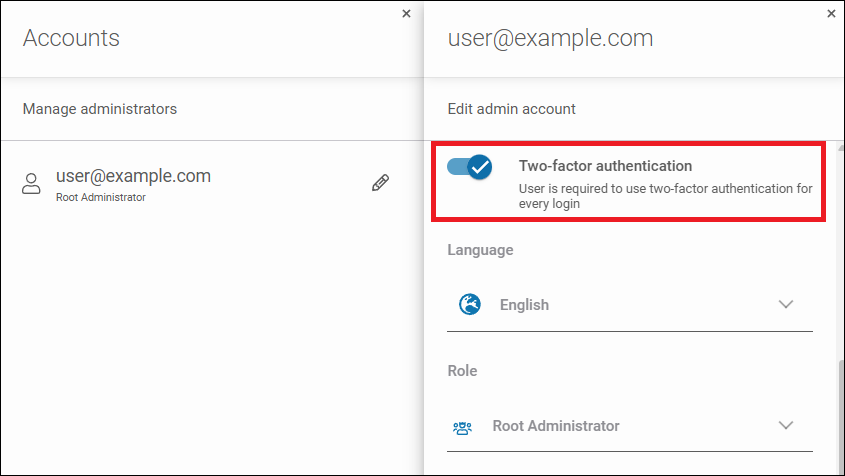
Administrators should note that the long-term plan is to make 2FA mandatory for all accounts. The rationale is clear. Recent high-profile incidents, such as the compromise at XTB, involving the lack of two-factor authentication, led to substantial losses. The latter underlines the cost of insufficient protection.
SSO centralizes identity, but it doesn’t magically stop session hijacking, cookie theft, or MFA-fatigue style prompts. A platform-side 2FA step narrows the blast radius when IdP rules are misconfigured or when a token leaks.
Check out in practice how to enable 2FA for all account types and take advantage of the additional layer of security in Xopero ONE:
In terms of a practical rollout consider the following:
- Enable 2FA for all roles with the management console access.
- For service accounts, enforce app-based codes and include recovery procedures in your runbook.
- Include a quarterly 2FA attestation in your internal audit.
Confirming logins by entering an authorization code, also when logging in using SSO and SAML, provides the following improvements:
| Area | KPI | Target | Owner |
|---|---|---|---|
|
Security |
MFA coverage (MC) |
100% |
IAM |
|
Security |
Unauthorized Console Access Rate |
|
SecOps |
|
Reliability |
Lockout Rate (LR) |
<1% |
Helpdesk |
|
Ops |
Exception Debt (ED) |
0 |
Platform |
|
Audit |
Audit-Ready Evidence Freshness |
≤30 |
GRC |
Backup Chain Export Tool
The newest release also brings a new tool for Xopero ONE customers that allows them to export the entire backup chain in its original format to a selected location. The backup can be exported from any local storage, including NFS and SMB, to a specific local file system, including a USB drive, using a procedure that simplifies retrieving the necessary identifiers.
This solution is particularly useful in OT networks, where limited network bandwidth hinders rapid recovery. Now, data can be physically transferred and restored directly from the drive, using Xopero ONE Smart Virtualization Stick or Xopero ONE Standalone Agent. This makes the recovery process faster and more independent of network infrastructure.
GitProtect 2.0.5: Updates and Improvements
With the updated version of GitProtect 2.0.5, customers get the ability to use additional credentials during the restore process of Git repositories and Azure DevOps projects. It improves the efficiency of the restore process and reduces the time, especially when a user needs to restore a lot of data or multiple repositories.
Regarding other improvements, here’s the recap:
- The possibility of restoring repositories from the project’s backup in Azure DevOps. As a result, when restoring an Azure DevOps project, only repositories backed up by the same backup as the project are restored, ensuring consistency at the time of backup.
- Optimized data loading in Jira Granular Restore, allowing information to load faster in the interface, which significantly streamlines the restore configuration process.
- The ability to use existing custom fields when recreating Jira projects to keep the Jira environment more organized and simplify field management.
A more detailed overview of the GitProtect 2.0.5 update is available here.
To Sum it Up
The Xopero ONE 2.0.5 release is about operational certainty, not headline features. Backups and replication finish sooner, so you can push the window away from your business hours. Thus, you get less overhead on production storage, so applications are impacted less, and your IT infrastructure stays more responsive.
Replication tasks can run in parallel, depending on the option you choose. This increases the data throughput without the need of a major redesign. The deduplication feature now pulls its weight, so keep it on. Watch latency, and set a new baseline after the upgrade. If your task still drags, assume an environmental bottleneck and check if you’re using the optimal transport mode, verify CBT health, and detect any potential datastore hotspots.
Multifactor authentication (2FA) now applies when admins log in through SSO or SAML. The management console asks for a second auth factor, not just an identity provider. Such an approach cuts the chance of a takeover due to a leaked token or a sloppy IdP rule.
Together, the 2.0.5 release provides updates that give you shorter task runtimes, tighter RPO, and authentication that can withstand an audit.
Other changes:
- Enhanced task labels and the search feature for the easier distinguishing of backup, restore, or storage replication tasks.
- Standardized pop-ups regarding unsaved changes to minimize the risk of losing modified settings.
Xopero ONE v. 2.0.5 is available for download here.
We invite you to explore the latest features of Xopero ONE that allow for enhanced backup management and data security.
Try them yourself.
Simply log in to your Xopero ONE account or start your free trial today!
.