


Backup Encryption: Your Way to Prevent Data Leaks and Ensure Compliance

SUMMARY
- Advanced Encryption Standard (AES) is the modern & efficient encryption standard for backups.
- The best idea is to have 100% control over the decryption key (required to restore encrypted data), as per the BYOK model.
- Backup encryption protects your organization against data leaks and compliance issues.
- Encrypt all data on source and in transit, isolate decryption key, and test restores to ensure best practices.
Encrypting backup data may seem like just another security measure on paper. In practice, however, it can make or break your organization by protecting valuable assets from loss and leak, and you from paying a ransom and facing legal consequences.
In this article, we explore the fundamentals of data encryption (including the BYOK concept), examine its benefits, review best practices, and see how to implement highly secure encryption in practice using our backup platform, Xopero ONE.
What is data encryption and what are its types?
Data encryption is the process of converting readable unencrypted data into an unreadable string of random characters to protect it from unauthorized access.
To decrypt data, you need a decryption key (aka private key), which is generated before or during the initialization of the encryption process. This key features a specific bit length (e.g., 256 bits) and typically exists as a strong passphrase, an encrypted file in .key or .pem format, or a security token.
Types of data encryption
There are many encryption methods available. For convenience, we’ve summarized the common types of encryption in the table below:
| Division criterion | Type of encryption | Short description | Notes |
| Mechanism and keys | Symmetric encryption | Uses the same key for both encryption and decryption. | Due to its speed, this is the standard for backup data. |
| Asymmetric encryption | Uses a key pair: a public key for encryption and a private key for decryption. | Less efficient, requiring higher computational power. | |
| Data protection state | In transit (in-flight) | Protects data in transit while it moves over the network. | Uses Transport Layer Security (TLS) and SSL protocols to protect against interception (e.g., Man-in-the-Middle attacks). |
| At rest | Secures data stored on destination media or servers. | Prevents unauthorized access to stored data. | |
| Encryption location | Client-side encryption | Encrypts data on the source endpoint device before transmission. | Recommended approach for backup data. Thanks to that, cloud storage providers can never see the data in plaintext. |
| Server-side encryption | Data is encrypted by the destination system only when written to storage. | Requires full trust in your cloud service provider or storage provider. |
Modern encryption standards
The most popular standard for backup encryption remains the Advanced Encryption Standard (AES). It is a military-grade algorithm selected through a competition hosted by the National Institute of Standards and Technology (NIST), and developed by Belgian cryptographers Joan Daemen and Vincent Rijmen (the Rijndael algorithm). AES supports key lengths of 128-bit, 192-bit, and 256-bit, allowing you to adapt the level of protection to your organizational needs.
The 256-bit variant (AES-256) is considered the most secure encryption method available and is practically impossible to crack using current computing power. It also delivers high performance thanks to hardware-based encryption acceleration through AES-NI instruction sets in Intel and AMD processors manufactured after 2010 and 2011, respectively.
An alternative to AES encryption is ChaCha20-Poly1305, which works well for less complex endpoint devices such as IoT hardware or smartwatches. Fun fact: ChaCha20 is used by the widely popular Signal messaging app.
Looking ahead, Post-Quantum Cryptography (PQC) is becoming a key area of focus. Quantum computers are expected to eventually break traditional encryption algorithms. With this in mind, NIST has developed new standards—ML-KEM and ML-DSA—designed to withstand the immense decryption power of quantum computing.
💡 Curious about the current state of cybersecurity in organizations? Want to learn more about quantum computing and other modern threats? Download our 2026 cybersecurity report
Decryption keys: Control the keys, control the data
You cannot decrypt data without the proper decryption key. For security reasons, you should store decryption keys outside the storage device or cloud service where the encrypted backup files reside. Keep in mind that the key can be a double-edged sword—if you lose it, you won’t be able to recover your encrypted data.
To maintain proper separation between cryptographic keys and encrypted backup data, organizations typically use three main approaches:
- External password/key management services, which can be hardware-based (e.g., FIDO USB keys) or software-based encryption tools (e.g., cloud storage provider solutions like AWS Key Management Service, Azure Key Vault, or HashiCorp Vault).
- Key management systems integrated directly into your encryption software or backup platform.
- Local files / offline storage, where decryption keys are saved as files and stored offline on physical media inside a safe.
What is Bring Your Own Key (BYOK)?
In the BYOK model, you generate your own decryption keys (for example, during backup plan creation) and manage keys independently when you need to decrypt data during a restore.
Your cloud service provider or storage provider (such as AWS S3, Azure Blob, or a third-party data center) only stores the encrypted data and has zero visibility into its content because they don’t have the private key or secret key.
In practice, BYOK gives you full key control and ensures secure isolation of encrypted files from the decryption key.
Why encrypt backups: Key benefits of backup encryption
Now, let’s focus specifically on backup data. Backups are a vital asset that serves as your ultimate lifeline during an incident. That’s why backups are also a primary target for cybercriminals.
Protection against data breaches and extortion
Ransomware attacks occur almost daily. Once threat actors infiltrate an environment, they actively hunt for backup files because:
- They consolidate all sensitive information and corporate data in one location.
- They are rarely monitored in real-time by SDR/XDR security posture solutions, making it easier to exfiltrate sensitive data in the early stages of an attack.
- Deleting backups before destroying or corrupting the production environment deprives victims of recovery options, creating maximum leverage to force a ransom payment.
When you encrypt backups, cybercriminals can’t read and leak your sensitive information even if they manage to steal data and transfer it to their infrastructure. This deprives attackers of their primary blackmail leverage. Combined with immutable backup technology and the 3-2-1 backup rule (replicating copies across different locations), backup encryption enables you to neutralize attacks and restore operations quickly.
Regulatory requirements and compliance
Using encryption software on backups ensures compliance with regulatory requirements and helps avoid harsh financial penalties. This is especially crucial when handling sensitive information and personal data.
Article 32 of the General Data Protection Regulation (GDPR) explicitly requires “pseudonymisation and encryption of personal data”. Furthermore, under Article 34(3)(a) of the GDPR, if encrypted data is stolen but the decryption key remains uncompromised, you are generally exempt from notifying individual data subjects about the breach.
Backup encryption is also mandated or recommended across various standards and framework mandates, including the NIS2 directive, national interoperability frameworks, DORA, PCI DSS, ISO/IEC 27001, and HIPAA (Health Insurance Portability and Accountability Act).
Public cloud storage security
If your organization relies on the cloud-first strategy or replicates backup files to a public cloud service (such as AWS, Google Cloud Platform, or Microsoft Azure), cloud encryption is an essential security measure to prevent unauthorized access and data leaks.
Backup encryption strategy and best practices
Based on what we’ve already learned, here is a list of best practices for encrypting your backup data:
- Encrypt everything—modern AES encryption algorithms are highly efficient and will not strain your infrastructure. Encrypting all backups prevents costly mistakes, such as accidentally leaving a critical database containing sensitive data unencrypted.
- Use client-side encryption—if your backup or encryption software supports encrypting data before it leaves the local environment, take advantage of it! This ensures that data stored in the target repository remains completely unreadable to anyone but you.
- Protect data in both states simultaneously—ensure robust security both in transit and at rest. Secure data in transit using Transport Layer Security (TLS) and at rest using AES-256.
- Follow the correct operational order—while your software-based encryption tool should handle this automatically, it is important to understand the process. Encrypted information appears as random noise, making subsequent backup compression or deduplication impossible. Therefore, encryption should always be performed as the final step.
- Isolate decryption keys from backup data—store your keys on a separate server or isolated system. You should maintain full key control under the BYOK model. Use a secure password manager or rely on the key management systems integrated into your backup software running locally or in a private cloud.
- Diversify and rotate encryption keys—assign unique keys to different backup plans, departments, or environments. Periodically rotate your cryptographic keys to maintain a strong security posture.
- Test encrypted backups regularly—creating a backup is only half the battle. Periodically (e.g., quarterly) test your restore process to verify that you can decrypt data and recover systems without data corruption. You can set up an isolated virtual test environment that mirrors production for this purpose.
How to configure highly secure backup encryption in Xopero ONE
By implementing all these best practices, Xopero ONE Backup & Recovery can protect your organization from data breaches, financial loss, and regulatory non-compliance.
See how to enable and set up secure AES encryption when configuring a backup plan in Xopero ONE step-by-step:
- Complete the basic setup steps based on your target workload (e.g., server, database encryption, virtual machines). Review our general process guide or search our knowledge base if you need more details.
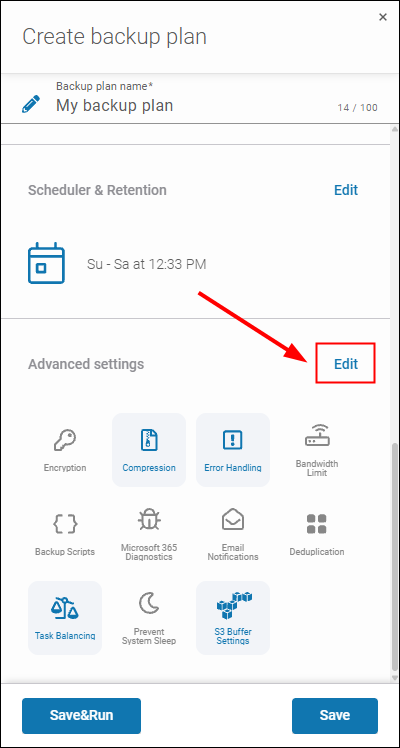
- Navigate to advanced settings by clicking Edit next to Advanced settings.
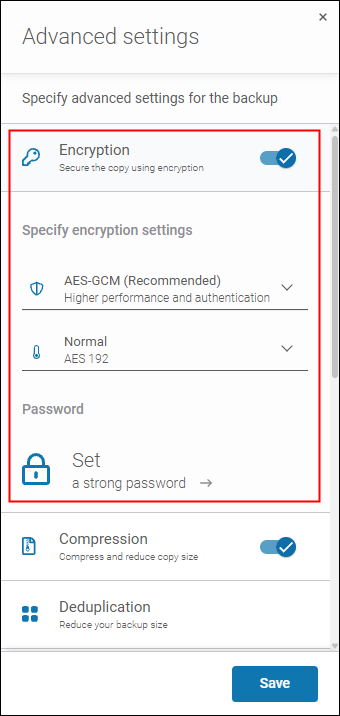
- Enable Encryption using the toggle switch and configure your encryption settings:
- Select your preferred AES encryption mode: AES-GCM (delivers higher performance and authenticated security) or AES-CBC (FIPS-compliant encryption for Windows environments).
Learn more about the encryption modes - Choose your desired AES key length: 128, 192, or 256 bits.
- Click Set a strong password to select an existing decryption key or create a new private key.
- Select your preferred AES encryption mode: AES-GCM (delivers higher performance and authenticated security) or AES-CBC (FIPS-compliant encryption for Windows environments).
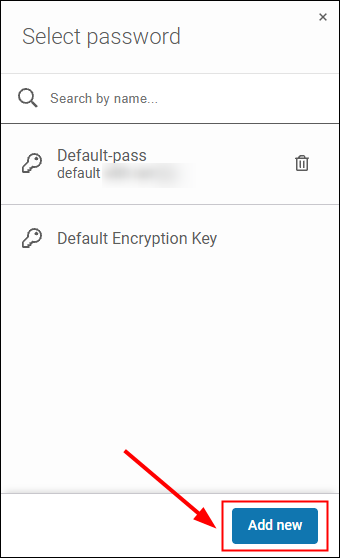
- Select an existing key from the list, or click Add new to generate a new key.
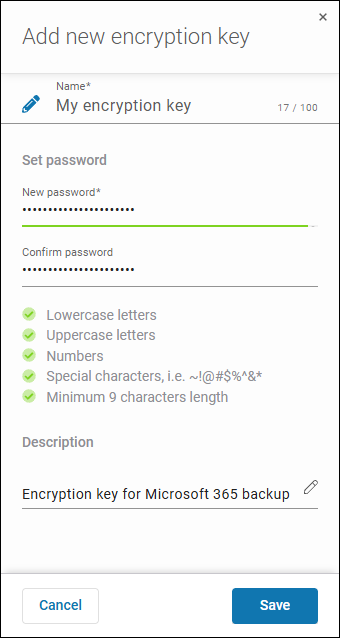
- In the Add new encryption key panel, enter a key name, set a strong password that meets complexity requirements, add an optional description, and click Save.
Note: Your passphrase is securely stored in the password manager integrated into Xopero ONE and is accessible only to authorized admin users.
- Complete the remaining backup plan configuration and click Save&Run (to run plan and encrypt backup data immediately) or Save (to execute according to your schedule).
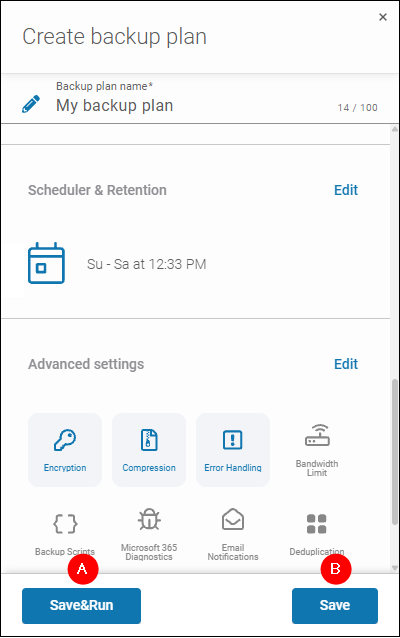
Now, when the backup plan is running, you can relax, knowing that your backup data is encrypted at the source before transmission, travels securely over the network, remains unreadable to unauthorized parties in storage target, and the decryption key is safely isolated in Xopero ONE password manager.
To maximize defense against ransomware and ensure business continuity, combine encryption with immutable backups and multi-location replication. You can start a 14-day free trial of Xopero ONE today (no credit card required) to test these features and more against your own environment specifics.