
Xopero ONE & GitProtect 2.1.0: Granular Backups and Enhanced Support for DevOps Data

The latest 2.1.0 release of Xopero ONE and GitProtect introduces several significant features and enhancements, especially when it comes to backing up DevOps environments. The new functionalities will particularly appeal to those who demand maximum flexibility and compatibility. Here is a summary of the most important changes:
- When creating Jira backups, you can now precisely select the specific spaces and elements you want to protect. No more need to back up everything at once.
- Azure DevOps backups now include support for Azure Artifacts, the built-in dependency library service.
- For GitHub, we now support a wider range of data types to include the ones introduced by GitHub Projects. It’s now also possible to quickly select repositories for backups based on custom properties.
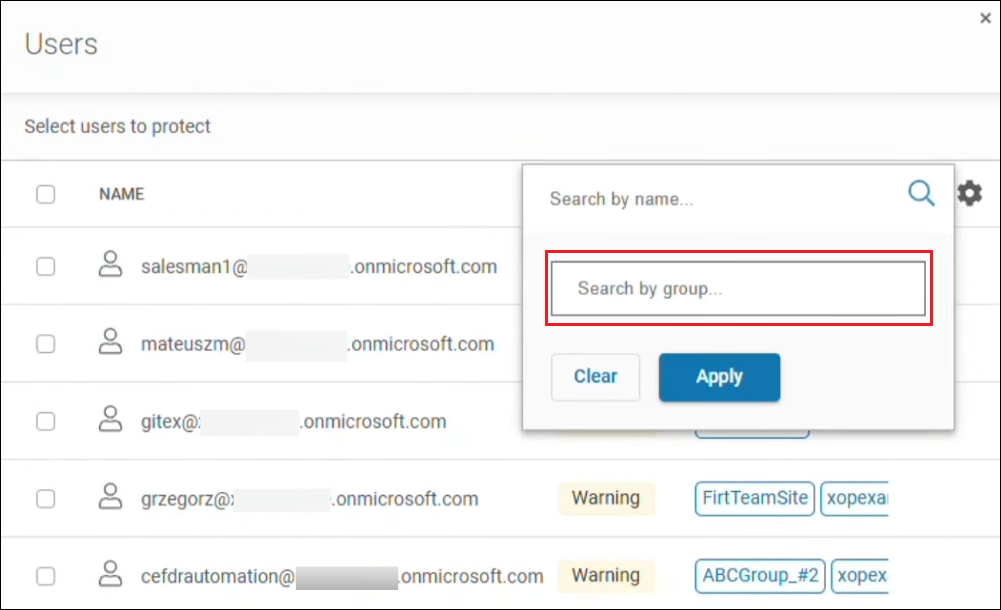
- With support for Microsoft 365 Groups, creating and managing Microsoft 365 backups has become significantly simpler.
Additionally, the 2.1.0 release includes numerous optimizations and bug fixes. As a result, our applications launch faster, and backup and recovery processes run more reliably.
Granular Control over Jira Backups
With some backup tools, including native solutions from Atlassian, you may be limited to full backups only. As a Xopero customer, you decide what you want to protect—whether it is the entire environment or only selected resources.
Precisely Select Spaces and Elements to Protect
Spaces (formerly ‘projects’) are a type of ‘containers’ for organizing a team’s tasks, issues, and workflows in Jira.
When defining a backup task in our applications, you can now precisely choose the spaces to include in the copy. What’s more, you can even specify individual elements for backup, such as versions, boards, issue comments, and much more.
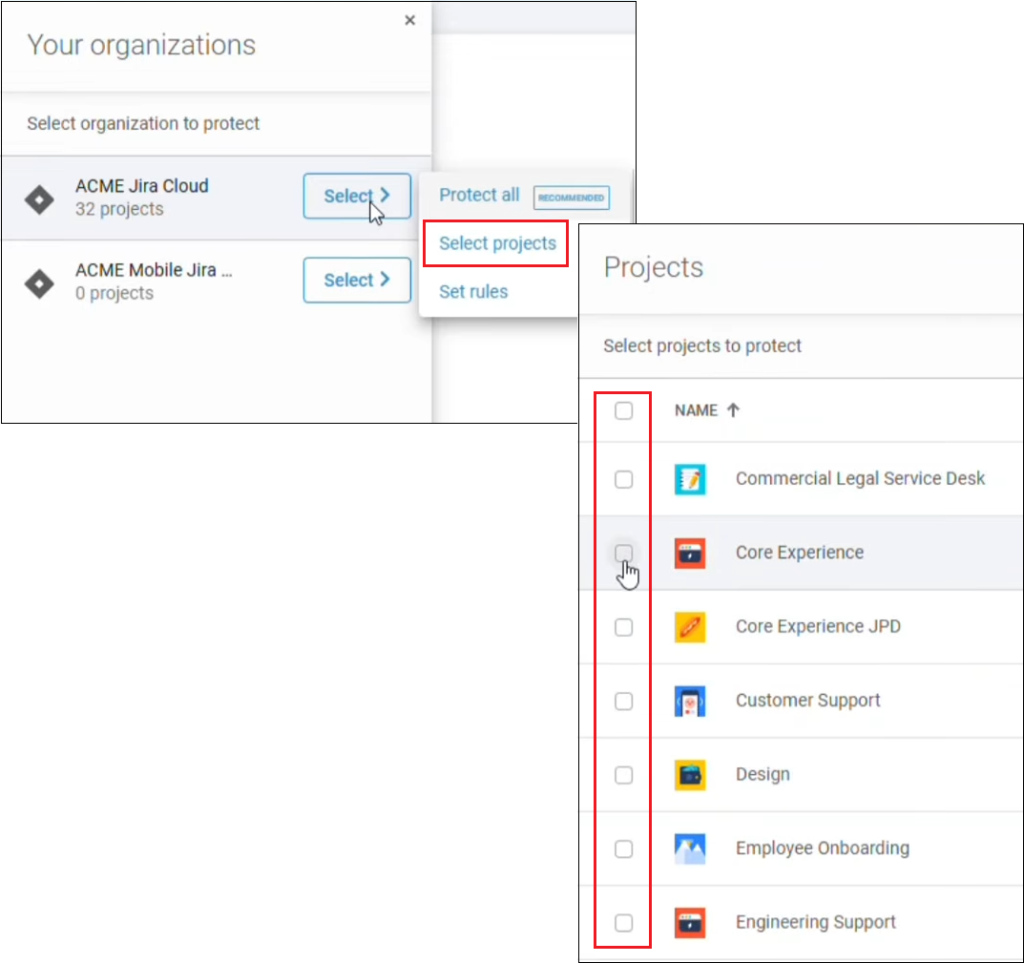
Thanks to granular Jira backups, you can improve your Recovery Point Objective (RPO), in particular by increasing the frequency of ‘lightweight’ backup tasks. Naturally, you can run full Disaster Recovery (DR) and granular Jira backups in parallel to ensure both comprehensive protection and maximum flexibility.
Furthermore, granular Jira backups allow you to handle specific data recovery scenarios, such as:
- Splitting or merging Jira organizations
- Restoring only selected spaces when spinning off a new organizational unit
- Testing new configurations for change management purposes
Exclude Attachments from Disaster Recovery Copies
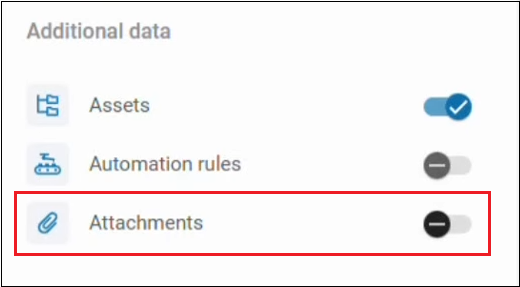
Enhanced granularity also means you can exclude attachments from Disaster Recovery copies. These files are often very large, which can substantially slow down the execution of full Jira environment backups. Thanks to the new option, you can create Disaster Recovery copies much faster. Instead, attachments can be included in separate, independent cyclical backups to ensure full data coverage for the entire Jira organization.
Support for Azure Artifacts in Azure DevOps
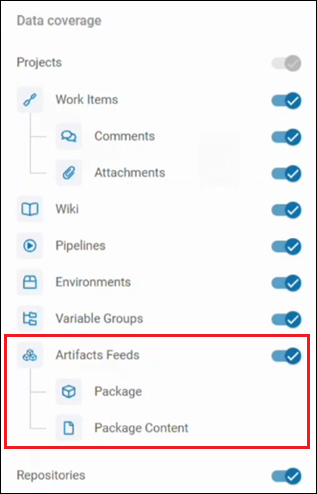
Azure Artifacts is a package management service built into the Azure DevOps environment. It allows development teams to store, share, and use library dependencies (such as npm or NuGet) with the developed applications via so-called Feeds.
Our backups can now include package Feeds with associated settings (permissions, views, and upstream source connections), in addition to repositories, metadata, and LFS assets. Consequently, your copies are fully comprehensive, covering every component of an application under development and providing total protection for your DevOps environment.
Support for More GitHub Data Types and Rules Based on Custom Properties
By extending the scope of supported data and metadata, the new release offers more comprehensive backup support and aligns with the latest features of the GitHub ecosystem.
GitHub Projects and Support for New Data Types
With the release of Projects—a modern project management tool—GitHub introduced new data types to describe projects in a more detailed way.
Starting with version 2.1.0, our applications support GitHub Projects data and metadata, ensuring your backups are complete and compliant with the latest changes in GitHub.
Quickly Select Repositories for Backup Using Custom Properties
Custom properties are metadata configured by GitHub organization administrators and assigned to repositories to facilitate organization and management.
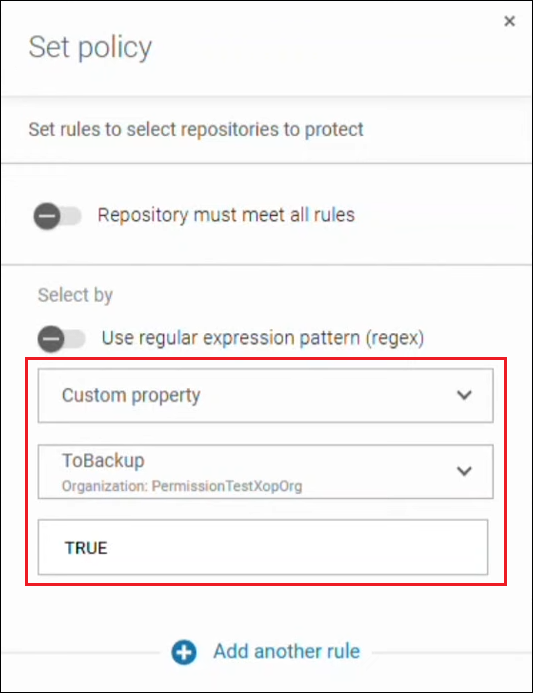
Xopero ONE and GitProtect can now read custom properties in GitHub, allowing you to create repository selection rules for backups based on these properties.
The new option lets you quickly add resources with specific custom properties to a backup job without the need for manual selection, which is particularly beneficial when managing a large number of repositories
Easier Microsoft 365 Backups with Groups Support
Microsoft 365 Groups provide a way to connect users into teams to facilitate collaboration on projects or files, such as through a shared mailbox, calendar, or OneDrive resource.
As of version 2.1.0, our applications leverage the Groups functionality to enable faster and easier selection of users whose data should be included in a Microsoft 365 backup. User management has become easier, too. You can filter and search users by Groups, with the structure mirrored exactly from your Microsoft 365 environment.
Improvements and Fixes
In addition to the new features, the 2.1.0 release brings several performance enhancements. Both Xopero ONE and GitProtect now launch faster. We’ve optimized permission management and integration processes for external identity providers (such as Google) for security and performance. Furthermore, our Research & Development Team has addressed known bugs to ensure that our apps work even smoother and are more intuitive.
Release 2.1.0: More Comprehensive and Granular Protection
With the 2.1.0 release, our customers can benefit from a more complete protection of their environments. They can also use granular backup options for better flexibility and resource savings. Thanks to the new features, optimizations, and fixes, backup, replication, and data recovery processes take less time, making our solutions more efficient to use.
For a complete list of changes, refer to the official changelog.
If you are not our customer yet, but want to effectively protect your organization’s data, you can try out our backup and recovery tools right now. To test GitProtect.io for free for 14 days, visit the product page. If you also need to safeguard physical and virtualized environments, click the button below to start a free trial of Xopero ONE Backup & Recovery (no credit card required).