

Backup Strategy: A Comprehensive Guide To Avoid Data Loss

Data is no longer just an asset—it is the backbone of operations and a source of strategic competitive advantage. Data loss can lead to downtime, financial losses, and, in some cases, even the collapse of a business. This makes a robust backup strategy essential for ensuring business continuity and secure growth.
A backup strategy means more than just a regular file backup. It’s a well-thought-out system covering data classification, selecting appropriate methods and locations for data storage, setting up a schedule, and defining recovery objectives in case of disaster. When planning and implementing a robust strategy, you need to consider backing-up as the key process to ensure data protection. To be effective, your strategy should be tailored to the specific needs of the organization, taking its structure, business priorities, and regulatory requirements into account.
In this article, you’ll learn about all the essential components and best practices of a successful backup strategy to protect data effectively and ensure business continuity.
What Exactly Is a Backup Strategy?
A backup strategy is a comprehensive action plan designed to protect against data loss and ensure data accessibility in the event of a failure. It is a systemic approach to creating and storing data copies, so you can recover data easily and quickly.
In case of a disaster, a solid strategy minimizes the risk of downtime and allows an organization to resume business operations with minimal losses.
Key Components of an Effective Backup Strategy
Data Importance Assessment and Classification
As a part of data risk management, every organization must determine which assets are the most critical to its operations. A solid production data classification not only helps you set priorities or ensure maximum protection for critical data but also save money. For example, it prevents storing low-value data on expensive storage.
Data classification involves categorizing data according to its sensitivity, value, and criticality to daily business operations and regulatory compliance. For instance, customer sensitive data may be crucial for reasons related to General Data Protection Regulation (GDPR). While financial records are vital for business continuity.
In terms of the practical application, you can follow ISO 27001 guidelines to classify an organization’s data into categories. A common practice is to use these 4 ones: Public, Internal, Confidential, and Critical. To classify each asset, apply the following 3 criteria:
- Availability (Is the data required for organization’s operation?)
- Compliance (Is the data backup required by a regulation?)
- Replaceability (Can the data be easily recreated?)
You can gather your findings in an Excel spreadsheet or a Governance, Risk, and Compliance (GRC) solution for a common reference point.
Backup Scheme and Scheduling
Choosing the right backup scheme is fundamental to maintaining control over data security. Backup schemes revolve around the three main types of backups:
- Full Backup—a complete copy of all data, offering the most comprehensive protection and the fastest data restore. It is also time-consuming and storage-intensive.
- Incremental Backup—only backs up changes since the last backup (whether full, incremental, or differential), saving time and space. However, it requires a full backup when restoring data.
- Differential Backup—copies only the data changed since the last full backup, allowing for faster data recovery compared to incremental backup.
Modern backup solutions usually offer several predefined backup schemes that impose a specific schedule for creating copies. Here’s a screenshot showing backup schemes available in Xopero ONE Backup&Recovery, our backup, recovery, and business continuity software platform:
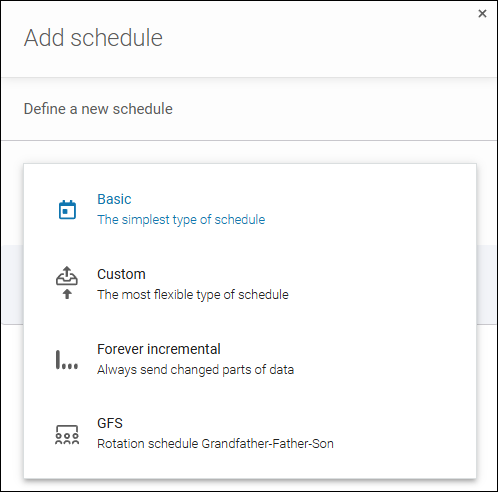
For example, the Grandfather-father-son (GFS) scheme is an industry standard, and involves full backup (grandfather) created once a month, differential backups (father)—once a week, and incremental backups (son)—once a day.
What’s more, it’s usually possible to define a custom scheme with a personalized schedule where you can precisely define date and time for each copy type.
Learn more about scheduling and backup schemes from Xopero blog article
Optimal Backup Data Location(s)
Data store options include onsite (external drives, local servers, NAS device) and offsite storage locations (external cloud environments, data centers, drives kept offsite, etc.).
Combining both the location types provides the highest level of data protection. Using a modern backup software platform or an all-in-one appliance, you can easily replicate your backup storage to follow a desired backup rule, such as 3-2-1 backup rule, and maintain local and cloud backups.
Recovery Objectives for Benchmarking
Setting up backup frequency and storage policies is essential to meet business expectations and regulatory requirements. These directly impact the most important data recovery KPIs such as:
- Recovery Point Objective (RPO) that defines the maximum amount of data that can be lost, aligned with backup frequency. For example, a 24-hour RPO means an organization can afford to lose data from the last 24 hours because backups run at least once daily.
- Recovery Time Objective (RTO) that specifies how quickly data should be restored to resume operations. For example, a 4-hour RTO for an organization’s email system means that the IT team has up to 4 hours to get the email system up and running. In the meantime, employees can use phones or temporary chat apps. The general rule is, “The less, the better”.
See our comprehensive guide on RPO and RTO for more information
Backup Strategy Best Practices
Below, you can read about the best practices to follow when applying your backup strategy. We’ll show you how to do it practically with Xopero ONE.
Follow the 3-2-1 or (Even Better) 3-2-1-1-0 Backup Rule
The 3-2-1 rule is a fundamental principle in any robust backup strategy. This simple yet effective standard suggests keeping 3 copies of your data: 1 original and 2 backups. It’s also beneficial to keep these copies in 2 different data stores (for instance, on a local disk and in the cloud) to reduce the risk of a single media type failure. And crucially, 1 copy should be kept offsite. This way, in case of hardware failure or unexpected events like flooding or a cyberattack, your data remains secure in that other location.
And if you wish to protect your data even better, you can decide on more comprehensive backup standards like 3-2-1-1-0 or 4-3-2. To learn more about them, head on to this Xopero blog article.
Now, let’s see how to do it in practice. Using the Storages menu in Xopero ONE, you can define multiple locations to store backups. These can be a cloud storage, a local directory, or a network share—both onsite and offsite. The choice is yours.
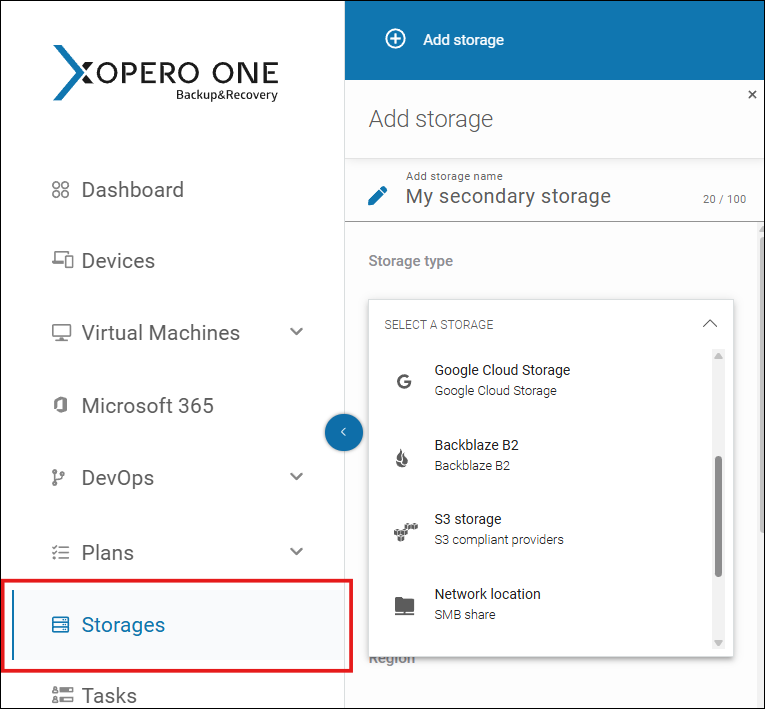
Next, configuring a backup or a replication plan in Xopero ONE, you can choose the locations, so that you meet the requirements of a given backup rule (e.g. 3-2-1) and ensure a much higher level of protection for your data. Learn more
Automate Data Backup and Recovery Processes
Automated backups are no longer just a convenience—they are a necessity, especially in larger organizations. With automation features built into backup software, copies can be created at regular intervals without human intervention, minimizing the risk of human error and ensuring the process runs by the schedule. This is particularly important when your IT team is busy with other tasks, as manual backups could be time-consuming and costly.
Automation also ensures compliance with company regulations and policies, since the system performs backups at strictly specified times, reducing the risk of missing critical data.
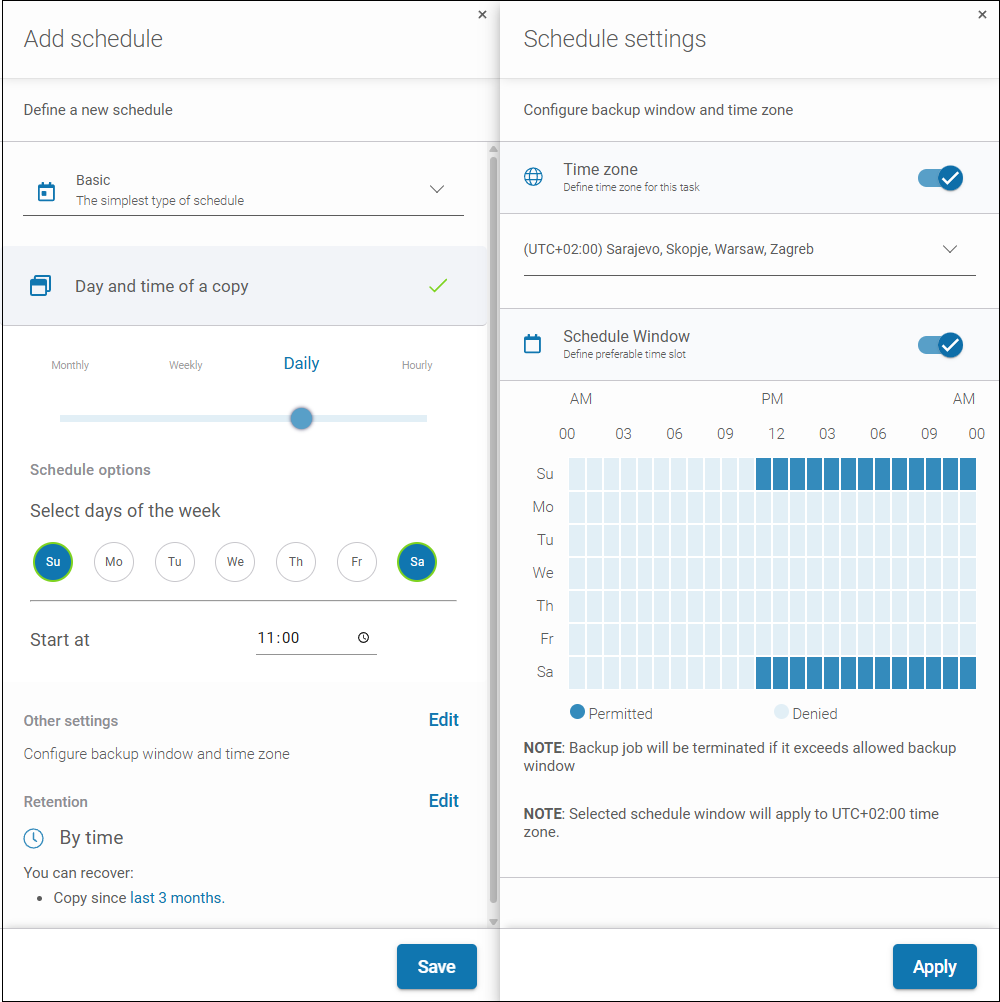
Xopero ONE lets you granularly configure automations from A to Z during backup plan creation. You can specify not only date or time to create a backup but also time zone or a precise backup window.
Learn more about automating backups
Ensure Both Endpoint and Cloud (SaaS) Environment Protection
A valid backup strategy must cover the organization’s endpoints, such as desktops or laptops of employees. Protecting these devices is essential as they are most vulnerable to data loss due to accidental damage or malware attacks. Doing so not only safeguards user data and improves overall security but also ensures easy data recovery, if necessary.
You also need to remember that SaaS applications, such as Microsoft 365, Google Workspace, or Salesforce, also require protection. Although stored in the cloud, the data in these applications and its protection is your, not a service provider’s, responsibility. This is because cloud operators follow the so-called Shared Responsibility Model. Consequently, organizations should also back up data in SaaS applications to ensure availability in case of a system failure or other event.
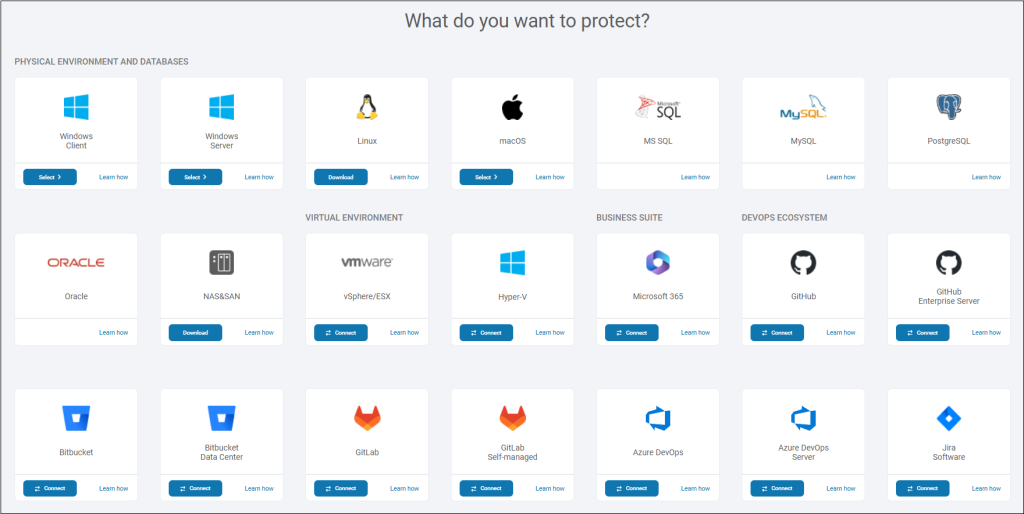
Xopero ONE allows you to safeguard a number of environments, including endpoints, servers, databases, virtual machines, Microsoft 365, or DevOps SaaS services. Defining a backup plan, you simply choose the environment that you want to protect:
Monitor backups
Even the most precisely designed backup strategy can’t protect you well if your organization fails to implement systematic backup monitoring. With professional monitoring in place, you can verify integrity and availability of archived data. In practice, it entails not only supervision over backup processes themselves but also regular testing of backups. Last but not least, backup monitoring enables immediate data recovery in critical situations.
In Xopero ONE, you can check the health of your backups immediately after logging in, on the Dashboard tab. You can see if a backup or a backup replication job has run without errors, see the details of the tasks, and even verify compliance with backup regulations.
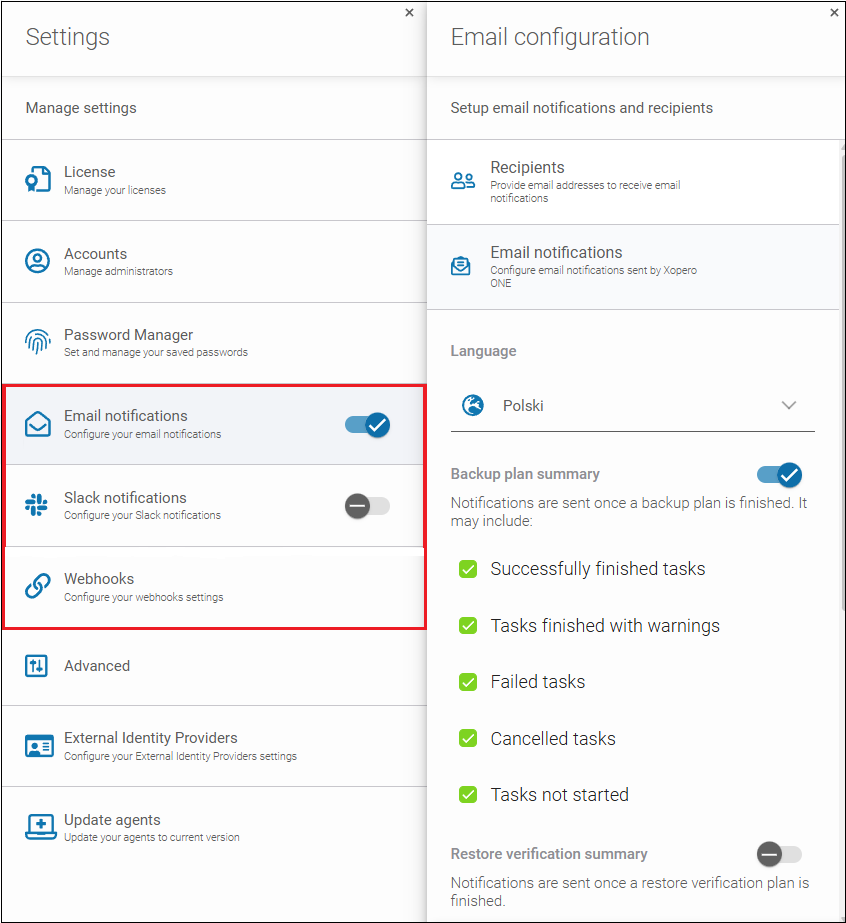
These are not all the monitoring capabilities. Our tool allows you to test backup copies, and even precisely choose who receives which notifications. Learn more
Safeguard Your Backup Copies
Backup security is the foundation of any holistic data protection strategy. Here, the end-to-end encryption (during transmission and storage) plays a key role. With this approach, your organization is certain that data will remain inaccessible to outsiders, even in the event of unauthorized access.
Equally fundamental is the implementation of the Zero Trust principles in the backup environment. Under this approach, only authorized users have the permissions to perform operations on copies (e.g., reading them).
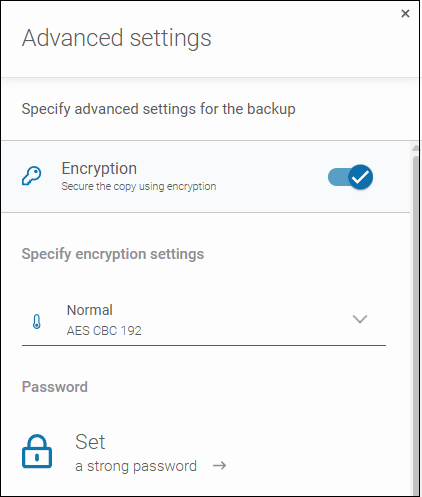
Xopero ONE offers a range of solutions securing backups during data transmission and storage, including data encryption, password protection, role-based access control (RBAC), or immutable backup.
Learn more about our data security technologies
Ensure Appropriate Data Lifecycle Management: Data Retention And Archiving
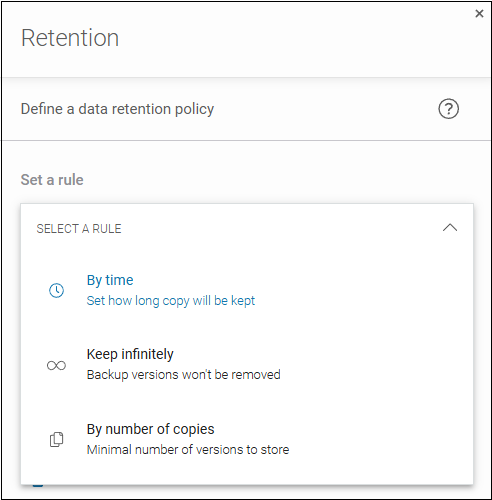
Long-term data storage, or archiving, is necessary for regulatory compliance, especially with laws like GDPR or NIS2 directive. The regulations require data to be stored for a specified period and selectively deleted when necessary. With an appropriate data retention solution in place, your data remains organized and easily accessible even for extended periods.
Using the scheduler in Xopero ONE, you can precisely define for how long you wish to keep a given copy. What’s especially exciting is that the feature lets you bypass the limitations of native retention policies for some environments (e.g. Microsoft 365). Learn more
Draw Up a Disaster Recovery Plan
A Disaster Recovery (DR) plan is crucial for ensuring full control over an organization’s business continuity. Its strategic goal is to guarantee that in the face of major disruptions—be they infrastructure failures, advanced cyber attacks, data breaches, or natural disasters—your organization retains the ability to quickly recover data and restore key systems to full operational efficiency.
While backups are an important element of the disaster recovery plan, non-technical security measures are also essential. These can include:
- precisely defined procedures,
- clearly assigned responsibilities, or
- regular team training (see next section).
With these in place, in the event of a failure, every employee can genuinely help in restoring the organization to full operations.
Educate and Train Your Staff
Employee education is a critical component of a data protection strategy. Training in data management, incident response, and regulatory compliance increases awareness of security and the importance of backups. Informed employees can actively support backup processes by identifying potential threats and reducing the risk of everyday data loss.
A trained team, aware of risks, can effectively counter threats through secure data practices and a greater focus on daily operations. Training also enhances their ability to respond quickly in emergencies, resulting in better protection of company data.
How to Choose the Right Backup Software?
Selecting the right backup solution is the key to effective data protection in any organization. An ideal system should be reliable, easy to use, scalable, and allow for automation and centralized backup management. It should also offer fast disaster recovery options, protect data integrity, and meet security and regulatory requirements. This way, in case of failure, critical information can be safely and efficiently restored, ensuring business continuity.
An example of such a solution is Xopero ONE Backup&Recovery, whose several features we’ve shown above. If you want to see if Xopero ONE is a perfect match for your organization’s backup strategy, you can start trialing it inside-out for 14 days for free.
For organizations seeking an even more advanced solution, Xopero Unified Protection offers ‘immutable storage.’ This all-in-one backup appliance ensures that data is resistant to tampering and deletion, which is crucial for ransomware protection. It also supports multiple storage spaces and replication plans, so you can follow any backup rule to make your copies super safe.
By choosing Xopero Software solutions, which combine reliability, scalability, and compliance with the highest security standards, companies gain the assurance that their data is not only secure but also easily accessible when needed.
Why Care about a Robust Data Backup and Recovery Strategy?
A well-designed backup strategy is an investment in the company’s stability and security. Although it may seem complex and time-consuming, the proper approach to data protection brings tangible benefits:
- minimizes the risk of data loss,
- ensures compliance with legal regulations, and
- builds trust among clients and business partners.
By following best practices like the 3-2-1 rule or automating backup processes, an organization gains peace of mind and a solid foundation for further growth.
While it’s impossible to predict every threat, implementing a solid backup strategy gives your organization an advantage in the face of unexpected events. This way, you can focus on achieving your business goals, knowing that even in case of a failure, your production data is secure, and the recovery process will allow for a swift resumption of operations.
Last but not least, a backup strategy is not only protection against worst-case scenarios but also a tool that enables any organization to operate responsibly and consciously, being prepared for the challenges of the modern technological world.