




Backup Types: Full Copy, Incremental Copy, and Differential Copy

Full copy, incremental copy, differential copy are the standard types of backup. The ability to use these backup methods is one of the most important advantages of professional backup software. It offers two crucial benefits:
- significant disk space savings through creating chains of different backup types (not only full ones), and
- ability to restore data with no errors through combining a full copy with other backup files (incremental and differential backups).
Let’s check what advantages and disadvantages of each copy type are, and see what you need to sacrifice to save storage space.
Types of Backup: One Backup, Many Possibilities
All the copy types are a good way to make sure your data is secure, but each is different. The difference mostly comes down to the choice between fast recovery time and storage space optimization. Let’s have a closer look.
Full Backup
To ensure that your files, disk images, databases, and other important information is secure, you create a copy of it in a safe location. That copy can be encrypted or compressed with a variety of algorithms, but it must include complete information about the protected data. That’s why it’s called a full copy. Full backup copy ensures complete data protection, allowing you to cover any disaster recovery scenario, regardless of reason: a critical data loss, hardware failure, etc.
Though time-consuming and storage-intensive, running full backups guarantees full protection and enables disaster recovery.
For example, let’s assume that you create a full copy every day, 7 days a week. In such a case, a full copy of data is saved to the storage of your choice (e.g. backup server) on a daily basis.
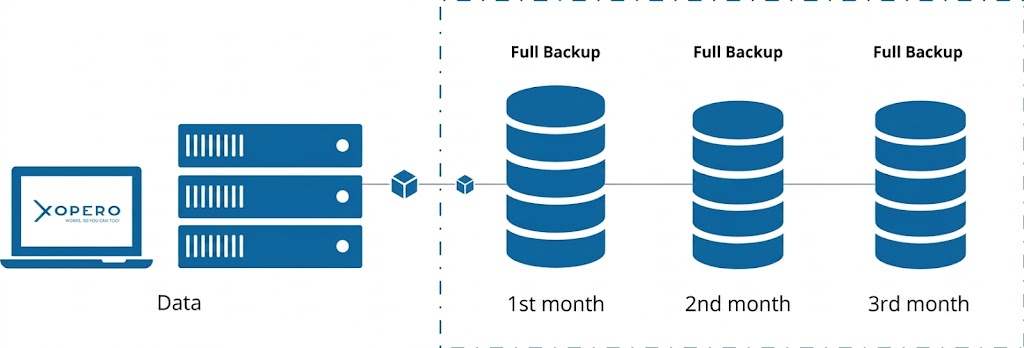
Data restoration from a full backup is straightforward. After recovering a chosen version, users have access to data included in that version. Recovery Time Objective (RTO) is also relatively short, because you don’t have to merge different copy types.
The big disadvantage of that type of copy is that it consumes a lot of storage.
| Pros | Cons |
| – Fast recovery time | – Requires a lot of storage space for all the data |
| – Short RTO | – Long time of backup process execution |
Incremental Backup
Technically speaking, incremental backup is about creating one full copy of data and then a chain of incremental copies. What is an incremental copy? It’s a copy that only stores the information about what changed since the previous copy.
Time savings in backup execution are especially noticeable for big files with not many changes over time. But time is not the only thing you can save. Incremental copies also use less storage space.
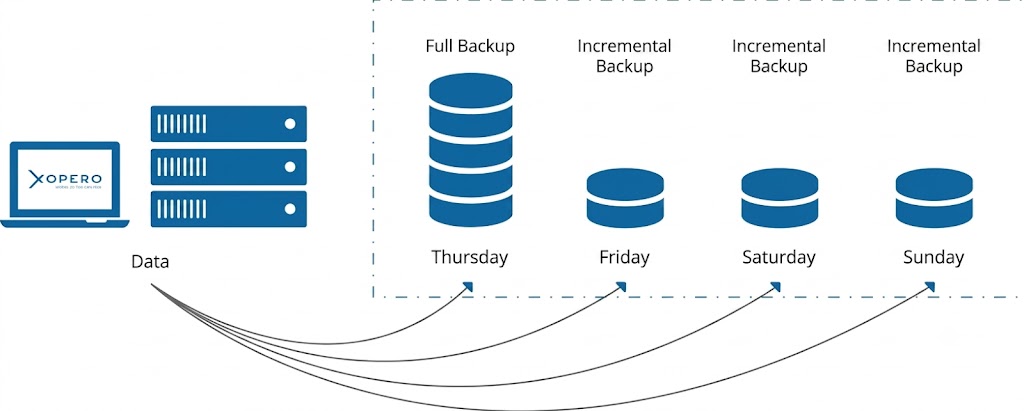
The primary disadvantage of this copy type is slower recovery time. To recover the last incremental copy, a backup system needs to recover the last full copy and all incremental copies in between. The more incremental copies have been created, the longer it takes to recover (RTO increases). To restore an existing backup, the backup system needs to stitch together more data.
To effectively use incremental backup, you should create a full copy from time to time, so that the chains of incremental copies don’t become too long. This approach is called mixed incremental backup.
| Pros | Cons |
| – Short backup process | – Slow data recovery (long RTO), because you need to merge all the copies in the backup chain |
| – More effective way to use storage | – Increased network use |
| – Requires more space to fetch all versions during restore |
Differential Backup
The differential backup strategy serves as a hybrid approach, balancing the benefits of full and incremental methods. The first copy is the full one. The second copy is similar to incremental backup—it contains only the data that changed from the full backup. When it comes to subsequent copies, the reference is always the last full copy, not the previous differential one. In other words, differential copy is more effective and saves disk space, because it includes only the data that has been changed or added, compared to the last full backup.
To recover, you just need to combine two versions of data—the one from a selected differential copy and the one from the preceding full copy. This, in turn, significantly reduces RTO.
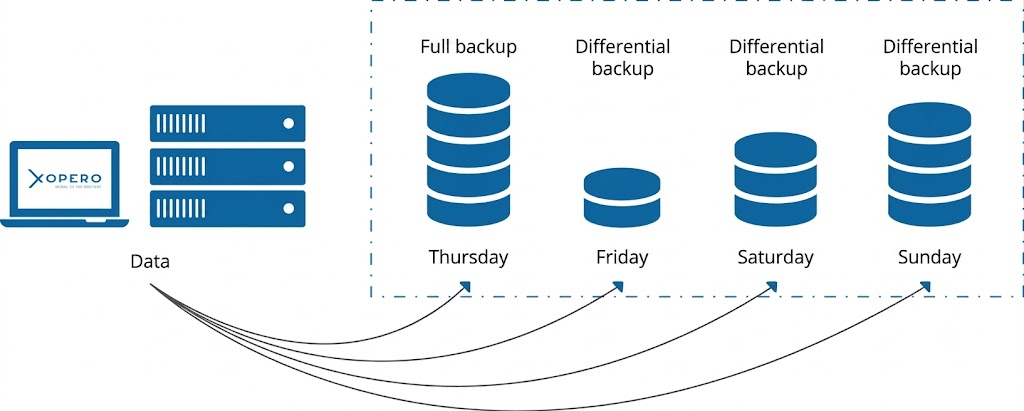
The main disadvantage is that each subsequent differential copy needs more storage space. Over time, as data drift increases, a differential backup can grow to rival the size of a full backup, diminishing its storage advantages.
It’s also common to implement a mixed differential backup. This is to minimize the impact of growing differential copies.
| Pros | Cons |
| – Less storage space required than for full copy | – The further from the last full copy, the bigger differential copies get |
| – Fast recovery time (RTO)—you only need 2 data sets |
Summarizing Full, Incremental, and Differential Copy Types: What to Choose?
Choosing the right backup copy type is crucial for optimizing storage, recovery time, and reliability.
The table below offers the summary of the key facts:
| Full copy | Incremental copy | Differential copy | |
|---|---|---|---|
| Backup creation speed | 🔴 Slow (you copy everything) | 🟢 Very fast (only changes since the last backup) | 🟡 Moderate (changes since the last full backup) |
| Storage consumption | 🔴 High | 🟢 Minimal | 🟡 Moderate (increases with each subsequent backup) |
| Restore procedure | 🟢 Only the full copy | 🔴 Full copy + all incremental copies one by one | 🟡 Full copy + only the last differential copy |
| Recovery time (RTO) | 🟢 Shortest | 🔴 Longest (whole copy chain merge) | 🟡 Short (full copy and single differential copy merge) |
| Failure risk | 🟢 Low | 🔴 High (single copy failure in a chain renders remaining unusable) | 🟡 Moderate |
To sum up, the general rules are as follows:
💡 If you look for stability and reliability, and storage capacity isn’t an issue, go for frequent full copies.
💡 If you have a very limited backup storage space, incremental copies will be perfect.
💡 When you want to balance the two approaches above, you should try differential backup.
💡 Regardless of your backup strategy, it’s a good idea to run a full copy, which offers the highest reliability and independence of recovery, at least once a month (or once a week for critical data).
Xopero ONE: Fast Backups and Optimized Storage
With a modern backup tool, you can choose a predefined backup schedule that uses multiple backup types simultaneously (full, differential, and incremental). Next, you can adjust the execution frequency based on available storage capacity, required backup speed, or desired recovery time objectives.
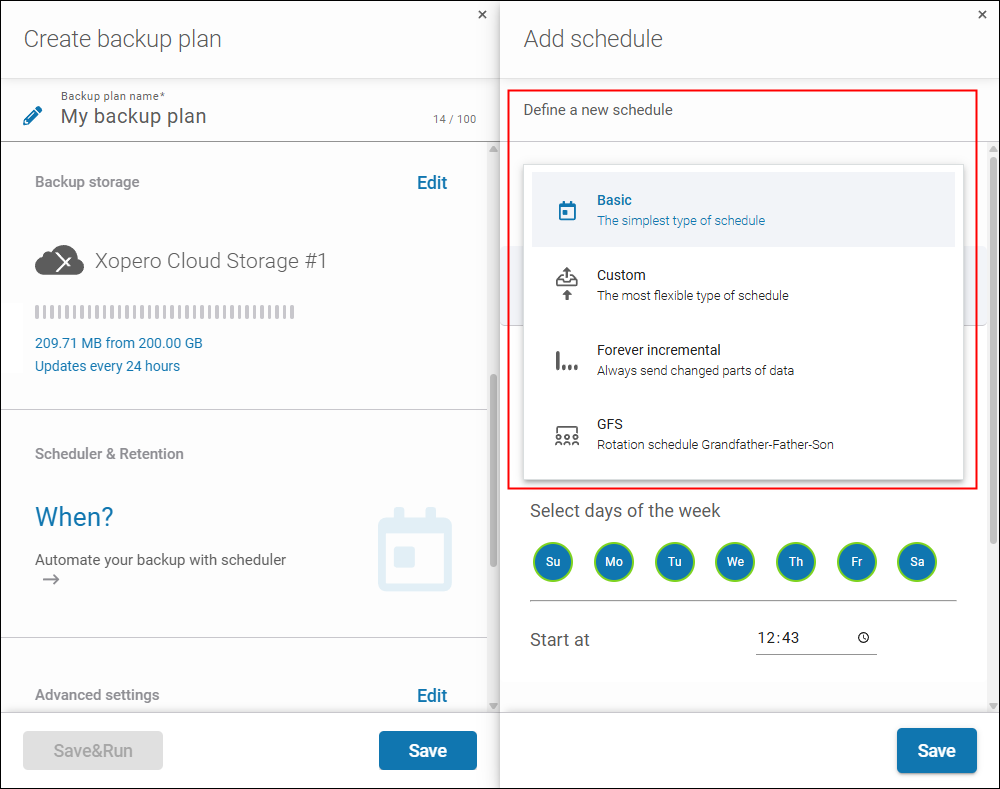
For instance, Xopero ONE offers the following schedules:
- Basic (full backup once a month and incremental backups daily)
- Custom (running full and incremental backups according to a customized frequency)
- Forever incremental (one full backup followed by incremental backups based on a set frequency)
- GFS (running full, differential, and incremental backups based on a set frequency)
💡 Learn more about modern and hybrid backup types supported by Xopero solutions, such as synthetic full backup or incremental forever backup
👉 See how to configure a backup schedule in Xopero ONE
Test modern data backup from Xopero for free for 14 days (no credit card required). See for yourself how to combine backup and recovery speed with reliability and storage space optimization in practice.